



10 Best Desk Sharing Software for Hybrid Work
Your office is one of your biggest expenses, but in a hybrid setup, how much of it is actually being used? Making decisions about real estate without clear data is just guesswork. This is where desk sharing software becomes more than just a booking tool—it’s a source of vital business intelligence. By tracking real-time usage and attendance patterns, you get the insights needed to optimize your space, reduce operational costs, and plan for the future. This guide will walk you through the top software options that provide the analytics you need to make smarter, data-driven decisions about your workplace.
Is Desk Sharing Software the Key to a Better Hybrid Office?
Hot desk booking software is essential for managing hybrid work environments efficiently.
- Streamlines desk reservations and office space utilization.
- Facilitates collaboration by ensuring team members can book desks based on in-office schedules.
- Maximizes office space usage and reduces operational costs.
- Essential for large teams or businesses looking to improve flexibility and remote work integration.
- Key tools like Officely, Robin, and Envoy offer tailored solutions for different organizational needs.
Desk booking software is one of the simplest pieces of software you can add to your workflows to make it easier to manage a flexible workspace, especially if you pick one that syncs well with the apps your teams use the most, such as Slack and MS Teams. The right app will help ensure your people get the most out of their time in the office, simplify desk sharing for everyone, and provide you detailed reports on resource utilization.
In this article, we’ll talk about the best desk booking tools out there and help you pick the right one for your needs.
What is Desk Sharing Software (And Why You Need It)?
Hot desking software is a tool that makes it easy for employees to reserve desks or workspaces ahead of time.
It’s built for hybrid and flexible workplaces and helps teams share desks, make the most of the available office space, and connect when they’re in the office. Most desk booking tools show which desks are free, enable team members to book them ahead of time, and sync with other tools and platforms you’re using, so that everyone can find a spot when they need it.
Physical Desk Booking vs. Remote Desktop Sharing
Before we go further, it’s important to clear up a common point of confusion. Desk sharing software is designed to manage physical office spaces, which is entirely different from remote desktop software that allows you to access a computer from another location. Both are useful for hybrid work, but they solve completely different problems. One helps you book a physical spot in the office, while the other gives you digital access to a machine that might be miles away. Let's break down the specifics of each.
Hot Desking Software for Hybrid Offices
Hot desking software is all about managing shared physical workspaces. As the team at People Managing People puts it, this software "lets people reserve desks, meeting rooms, and other office resources." Think of it as a reservation system for your office. It allows employees to see who is coming into the office, find and book a desk near their teammates, and reserve meeting rooms for collaborative sessions. This is the key to creating a flexible and efficient hybrid office, ensuring that no one shows up to find there’s no space left for them to work.
Remote Desktop Software for Remote Access
Remote desktop software, on the other hand, has nothing to do with booking a physical desk. This technology is designed to let you "see or control someone else's computer screen from a different location." It’s a tool primarily used by IT teams for troubleshooting or by employees who need to access files or applications on their office computer while working from home. It’s about creating a digital bridge to a physical machine, not about reserving a physical spot to place your laptop when you come into the office.
What to Look for in Hot Desk Booking Software
When you start looking for the right desk booking tool, you'll find a lot of options with a wide range of features. The best choice for your company depends on your specific needs, your team's size, and how you plan to manage your office space. Some features are nice-to-haves, while others are essential for creating a seamless experience for your employees. Focusing on a few key areas will help you find a solution that not only works but that your team will actually use. It's all about finding the right balance between powerful functionality and everyday usability.
Key Features to Consider
Choosing the right software means looking closely at its core features. You need a system that simplifies booking, provides clear visibility into office usage, and integrates with the tools your team already relies on. A great hot desk booking system should feel like a natural part of the workday, not another complicated tool to learn. From interactive maps to detailed analytics, each feature plays a role in making your hybrid office run smoothly. Let's explore some of the most important ones to look for.
Interactive Floor Plans
Many desk booking tools feature interactive floor plans that give a visual layout of the office, allowing employees to see available desks and book a specific spot. While this can be helpful for visualizing the space, it can also add unnecessary complexity. Some of the most effective tools, like Officely, skip the complicated maps and integrate directly into platforms like Slack and MS Teams. This approach focuses on simplicity and speed, allowing employees to book a desk with a simple command, which often leads to higher adoption rates since they don't have to learn a new interface.
Check-in and Check-out Functionality
A check-in feature is crucial for gathering accurate data on office usage. It confirms that an employee who booked a desk actually showed up to use it. Without this, your analytics might show that the office is at full capacity when, in reality, many desks are sitting empty due to no-shows. This functionality helps you understand true occupancy rates, identify booking patterns, and make smarter decisions about your office layout and real estate needs. It ensures your data reflects reality, not just intentions.
User Management and Permissions
Effective user management allows you to set specific rules and permissions for different employees or teams. For example, you might want to assign a specific neighborhood of desks to the marketing team or restrict access to executive offices. Good software will let you easily manage these permissions, add or remove users as your team changes, and group employees by department. This level of control is essential for keeping the office organized and ensuring that everyone can find the space they need without confusion.
Data and Analytics
The real power of desk booking software comes from the data it collects. Look for a tool that provides clear, actionable analytics on office attendance, peak usage days, and popular desk locations. This information is invaluable for making strategic decisions. Are you using your space efficiently? Could you downsize your office to save on costs? Do you need more collaborative spaces? The right data will help you answer these questions and optimize your workplace for how your team actually uses it.
Common Pricing Models and Free Options
Understanding how desk booking software is priced is key to finding a solution that fits your budget. Most companies use a subscription model, but the specifics can vary. Some charge based on the number of employees who will use the software, while others charge based on the number of desks you have available. It's also common to find free plans for very small teams or free trials that let you test the software before committing, which is a great way to see if it’s a good fit for your team.
Per User vs. Per Desk Pricing
Pricing models typically fall into two camps: per user, per month or per desk, per month. A "per user" model is straightforward and scales directly with the size of your team. A "per desk" model can be more cost-effective for companies with a high employee-to-desk ratio, such as those with a very active hybrid work policy where not everyone is in the office at once. It's important to calculate the costs for both models based on your specific situation to see which makes more financial sense for your organization.
Free Plans and Trials
Many software providers offer a free trial or a limited free plan, which is the best way to get a feel for the tool. This allows you to test its features and, most importantly, see how well your employees adopt it. For example, Officely offers a free trial for up to 5 employees that includes all premium features, so you can experience its full power. Taking advantage of these offers lets you make an informed decision without any upfront financial commitment, ensuring you choose a tool that truly meets your needs.
A Quick Look at Remote Desktop Sharing Software
While our main focus is on managing physical office space, it's helpful to briefly touch on remote desktop sharing software to round out the picture. This technology is a staple for many organizations, especially those with distributed teams or a heavy reliance on IT support. Unlike desk booking tools that organize people within a building, remote desktop software connects people to machines, no matter where they are. It’s a tool for access and control, enabling seamless work and support across any distance.
Common Features
Most remote desktop tools offer a core set of features designed for remote access and collaboration. According to Wikipedia, these typically include screen sharing, remote control, file transfer, and instant messaging. Some platforms also bundle in video conferencing capabilities. These features are essential for tasks like providing remote IT assistance, collaborating on a project from different locations, or accessing specialized software that only exists on an office computer. The goal is to make it feel as if you are sitting right in front of the remote machine.
The Importance of Security
When you're giving someone remote access to a computer, security is paramount. You are essentially handing over the keys to a machine that may contain sensitive company and customer data. Leading tools in this space prioritize security with features like end-to-end encryption, two-factor authentication, and compliance with standards like GDPR and HIPAA. As noted by TeamViewer, using bank-level encryption (AES-256) is a standard for protecting data in transit. Never compromise on security when choosing a remote desktop solution; the risks are simply too high.
10 Best Desk Sharing Software Tools for a Flexible Office
To make hot desking work, you need the right software tools. Whether you’re looking for a simple solution or an app that can cater to a large workforce, you’ll find the right platform in this list. We’ll walk you through ten of the best desk booking apps, so you can pick the best one for your needs.
1. Officely: For Top-Notch Usability, Flexibility, & Integrations
If you’re looking for a desk booking software that will simplify everyone’s life and make hot desking as intuitive and easy as possible, Officely is a top choice. It lives where your team already spends their days, in Slack or Microsoft Teams, making it super easy to implement into your existing workflows; your people won’t have to remember to open yet another app to book a spot in the office.
Instead, they can simply use Slack or Teams to let their coworkers know where they’ll be working from, and see who else is in the office. Because, let’s face it, nobody likes to commute to an empty office (or find out there’s no available desk for them!).
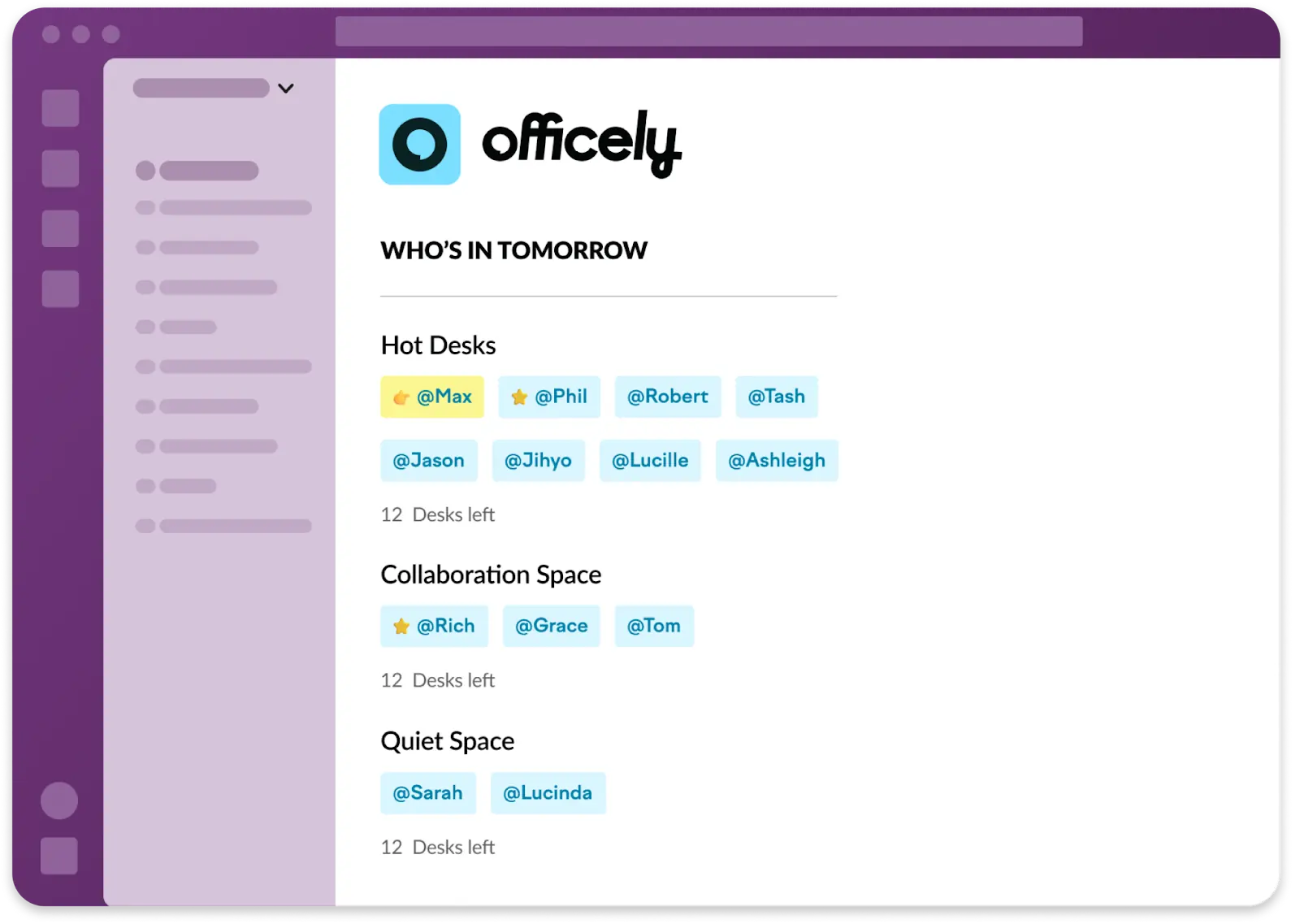
With Officely, your team members can easily see who’s in and when it’d make the most sense for them to come to the office
Officely solves all that by providing real-time updates on who’s where and when, encouraging attendance and collaboration in a non-forced way, and helping you organize social events easily, be it workshops or afterwork drinks.
Plus, thanks to its resource utilization features, the app makes it easy to understand how your team uses one of your most expensive resources, office space, and ensures you’re making the most out of it.
Additionally, Officely is very affordable, with prices starting at $2.50/user/month, making it a great fit for small and large businesses alike.
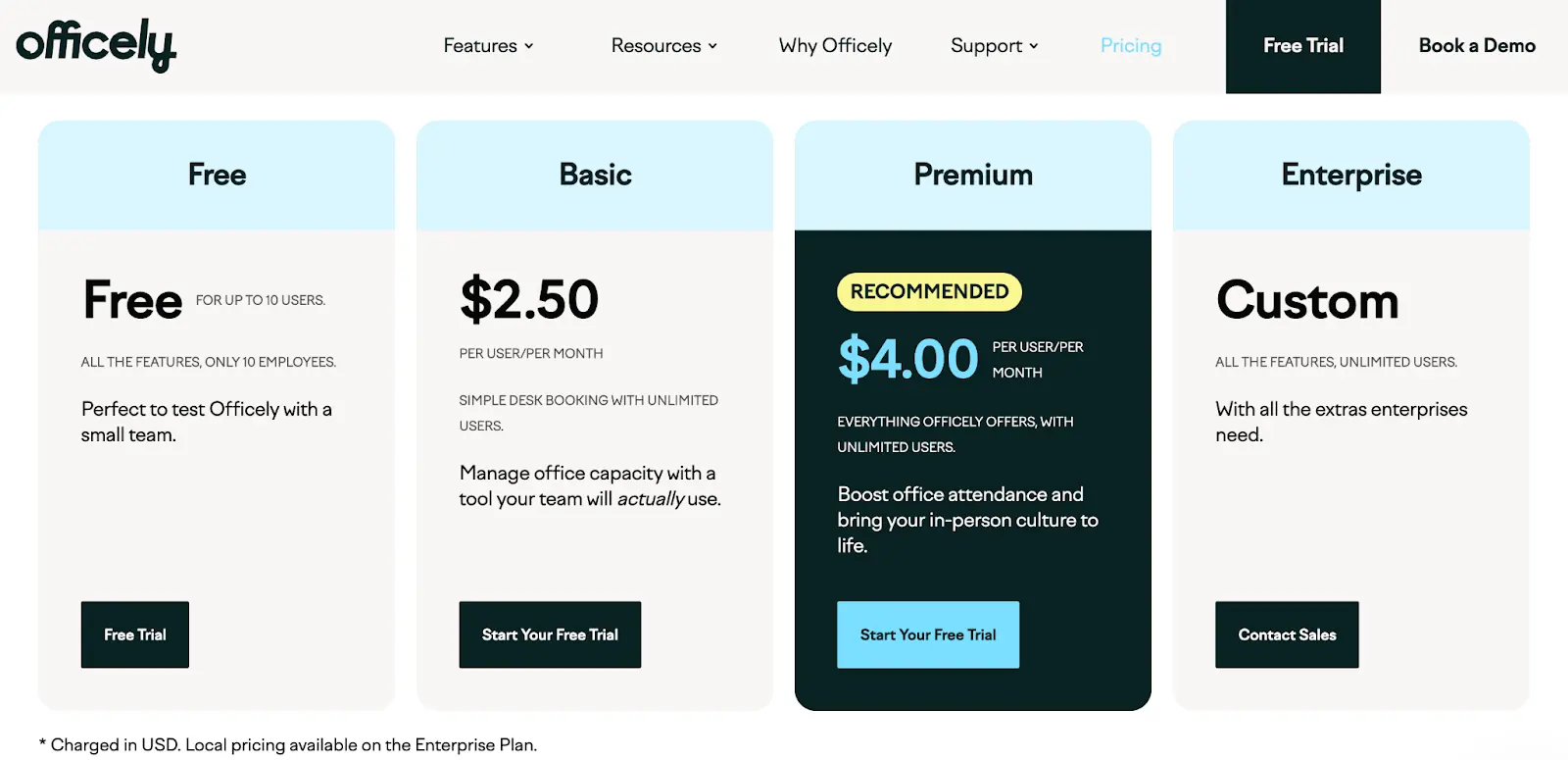
Officely is one of the most affordable tools out there and has a free version for up to 5 users
Want to know more and see whether Officely is the right fit for your company? Book a free demo to see how simple it is to implement and use.
Pros:
- Enables your team to quickly book desk spaces, meeting rooms, parking spots, and even spots for their pets
- Lives where your team already is – in your communication platform of choice (Slack or MS Teams)
- Very simple to adopt and use
- Gives you detailed insights into office use and attendance visibility
- Very affordable
Cons:
- Doesn’t have visitor management features
Free version? Yes, forever free for teams of up to 5 people
Price: Starting at $2.50/user/month
2. Robin: The Top Choice for Large Enterprises
Robin caters to large enterprises and has plenty of powerful features for big teams. It enables them to handle everything from desk sharing to visitor management and meeting room scheduling, and offers detailed analytics on occupancy and space use. Plus, it integrates well with many other tools, helping you build efficient workflows and processes.
In short, it’s a good fit for organizations that need to manage multiple office locations easily and have full control over their space. However, it can be overly complex to use; for smaller teams looking for simplicity, it’s an overkill.
Pros:
- Comprehensive analytics and reporting
- Strong space planning that simplifies the booking process
- Good fit for large organizations
- Integrates with a wide range of workplace software
Cons:
- May feel overly complex for small to mid-sized businesses
- Higher price point, best suited for larger companies
- Can require additional training and setup time
- Limited flexibility for smaller, more dynamic teams
Free version? No
Pricing: Available upon request
3. Envoy: For a Comprehensive Set of Features
Envoy is a tool that covers more than just desk reservation: It also offers solutions for visitor management, room booking, emergency notifications, and multi-tenant management. This makes it a good choice for companies that want a single platform to manage those aspects of their workplace.
The app’s dashboards provide insights into how spaces are being used, which can help with planning and optimizing your office layout.
While Envoy’s extensive feature set is ideal for businesses that need an all-in-one solution, it might be overbuilt for companies just looking for an affordable and easy to use desk booking tool. For smaller teams or those who only need a desk sharing app, Envoy’s features can feel overwhelming and unnecessary.
Pros:
- All-in-one solution covering desk, visitor, and room management
- Extensive analytics and insights for space optimization
- Well-suited for medium to large businesses
- Offers additional workplace safety check features
Cons:
- May be overbuilt for companies primarily needing a hot desking tool
- Requires more setup and customization to fit specific needs
Free version? No
Pricing: Starting at $3/user/month
4. Deskfound: The Definition of Simplicity
At the other end of the spectrum, you have Deskfound – a straightforward desk sharing tool designed for hybrid offices, enabling employees to reserve desks directly through Slack.
It connects with Google Workspace and Google Calendar and offers features like floor plan uploads and office usage reporting, making it a practical choice for teams seeking ease of use.
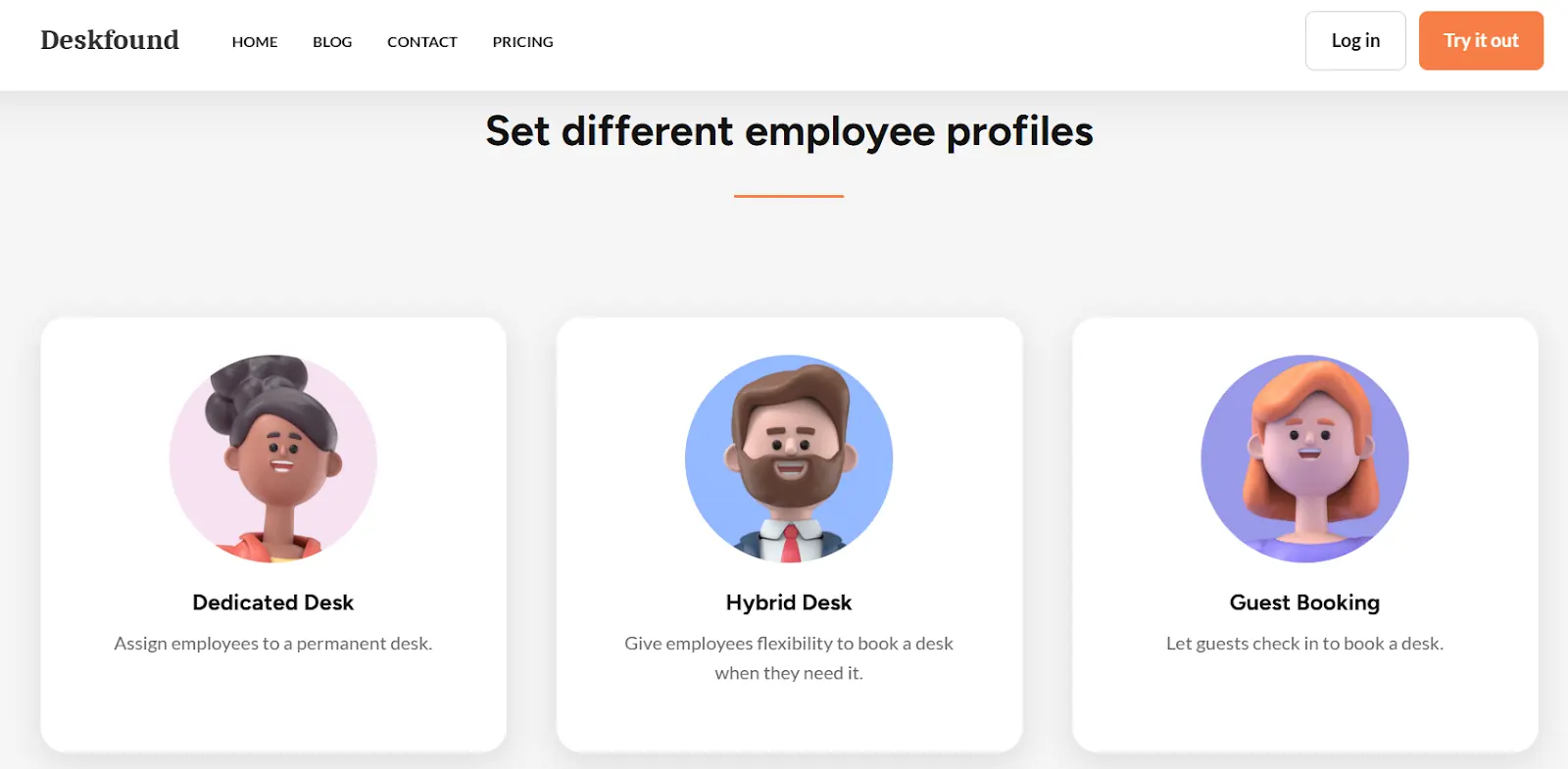
Deskfound enables you to set employee profiles based on your team’s needs
However, for organizations needing more powerful space management tools or integrations beyond Slack and Google Workspace, Deskfound might not fully meet their needs.
Pros:
- User-friendly interface with straightforward setup
- Includes a permanent desk option
- Affordable pricing, free for up to 10 users
- Floor plan uploads
Cons:
- Limited features for larger organizations
- Does not support integrations beyond Slack and Google Workspace
- Lacks comprehensive analytics
Free version? Yes, free for up to 10 users
Pricing: Starts at $1 per user per month
5. Eden: The All-in-One Workplace Management Tool
Eden is a platform designed to simplify various aspects of office operations, from desk sharing to visitor management, room scheduling, internal ticketing, and deliveries. This makes it a good fit for organizations aiming to centralize their workplace management, but might be an overbuilt solution for smaller teams.
All the features that Eden offers can make it too complex for users who need a simple and efficient solution. Plus, its hot desk booking system is sold in packs of 25 desks (at $2.25 per month), making it unsuitable for smaller teams or those who wish to stay more flexible.
Pros:
- Comprehensive suite covering different workplace management use cases
- User-friendly interface
- Advanced analytics for space utilization and optimization
Cons:
- May be overbuilt for teams who need a simple app
- Steeper learning curve
- Some features require additional setup and customization
Free version? No
Pricing: $2.25/desk/month, sold in sets of 25 desks
6. Archie: Designed for Coworking Spaces
Archie is a platform designed for hybrid offices and coworking spaces. It features all the usual suspects: desk and meeting room booking, visitor management, and workspace analytics. But, what’s different is that you can use Archie to manage a coworking space, too, so if you’re managing one or are renting a part of your office to others, it can be a good fit.
While Archie is very simple and intuitive, some users say they’d like to see more in-depth analytics and customization options.
Pros:
- Intuitive and modern user interface
- Good option for coworking space management, offering custom branding and automations
Cons:
- Some find its analytics and customization options a bit lacking
- May require additional setup and training for certain features
- Pricier than other options
Free version? No
Pricing: Starting at $159/month for 25 desks
7. Skedda: For Truly Customizable Space Management
Skedda simplifies the booking and management of various spaces, including desks, meeting rooms, and other shared areas. It offers interactive floor plans, allowing users to visualize and reserve the exact spot they want.
Skedda integrates with tools like Microsoft Teams, Outlook, and other Office 365 tools; plus, it has excellent analytics features that provide insights into how organizations use their resources.
On the other hand, some users say its space maps are not very intuitive, especially if you make a few changes at once; in those instances, versions get easily mixed up.
Pros:
- User-friendly interface with interactive floor plans
- Customizable reservation rules and policies
- Can be used for coworking spaces
- Offers discounted pricing plans for non-profit organizations
Cons:
- Some users report challenges with certain integrations and floor plan versions
- Limited support for more complex booking scenarios
Free version? No, free trial
Pricing: Starting at $99 per month
8. Condeco: Workspace Scheduling for Global Teams
Condeco offers lots of desk and space management features for large enterprises, including advanced analytics, integration with Microsoft 365, and support for flexible working arrangements. There’s also a mobile version that enables users to reserve a desk on the go.
However, its features can be overwhelming for smaller teams and require extra training.
Pros:
- Desk booking, meeting room scheduling, and workspace management in one
- Advanced analytics for space utilization and optimization
- Mobile app for on-the-go reservations
Cons:
- Extensive feature set that may be overwhelming for smaller teams
- Steeper learning curve
Free version? No
Pricing: Available upon request
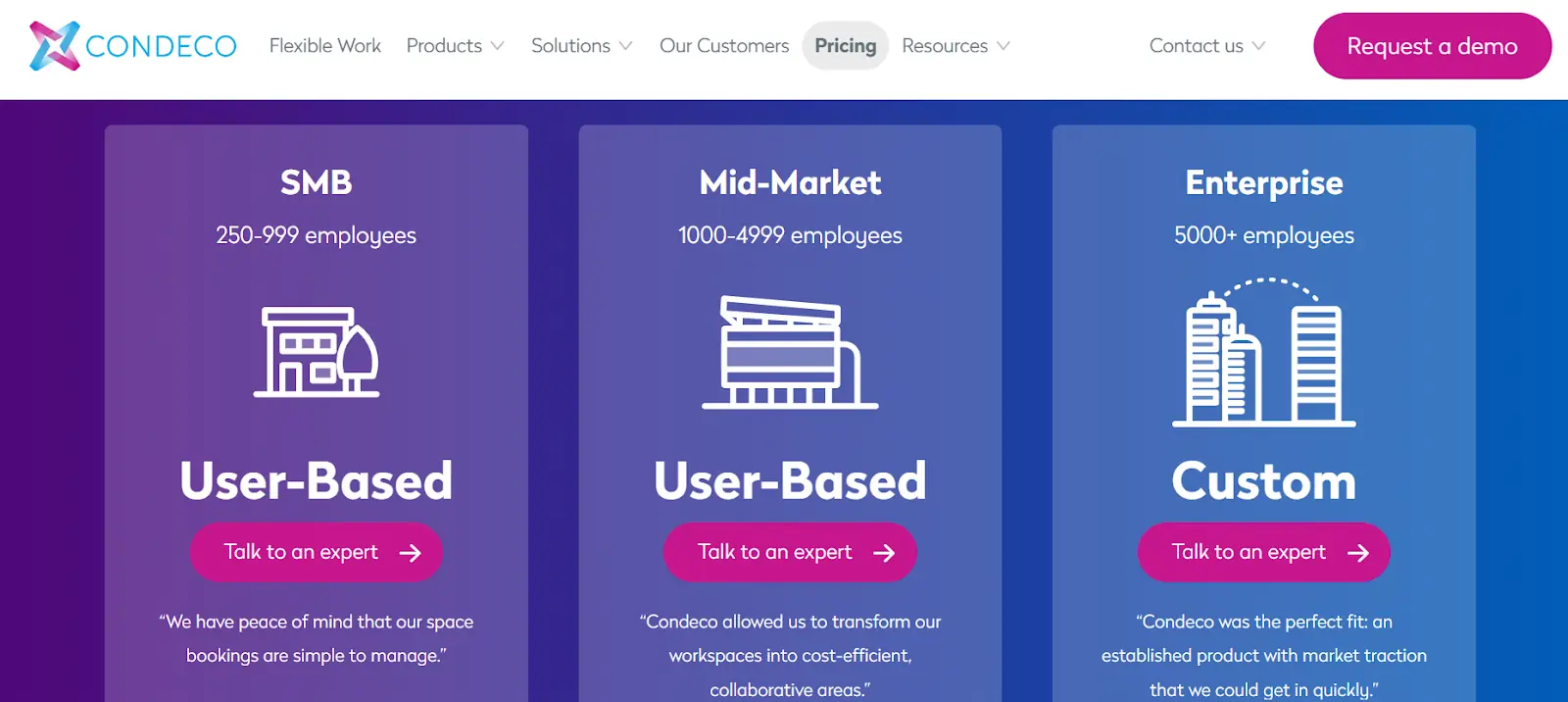
Condeco doesn’t offer pricing information on its website
9. WorkInSync: A Strong Focus on Employee Scheduling
WorkInSync is a user-friendly platform that offers desk sharing, meeting room management, and employee scheduling. With it, employees can define their own schedules, say when they’ll be in the office and in which area exactly, and have the app book a desk for them. This way, you can also keep track of how your space is used and who’s coming to the office and when.
While the platform is generally quite simple to use, some users report that their visitors occasionally find it confusing. Additionally, getting everyone trained on it can be a hassle, as it’s yet another app your people need to learn how to use.
Pros:
- Features desk booking, visitor management, and employee scheduling
- Advanced analytics for space utilization and optimization
Cons:
- Requires training
- Adoption might not be immediate
Free version? No
Pricing: Starts at $2.50/user/month
10. OfficeRnD Hybrid: For Seamless Visitor & Delivery Management
OfficeRnD Hybrid is a platform you can use to manage desks, visitors, and deliveries at once. Team members can see desk availability, book a spot, and coordinate schedules with their coworkers – and you can use it to simplify visitor access and deliveries.
Overall, it’s a flexible tool built for large companies, and one that helps them improve office operations. Despite this, some users mention that its customization and configuration options can be a bit limited and don’t always fit their use cases.
Pros:
- Comprehensive workspace management platform, including desk sharing, visitor management, and deliveries
- Advanced reporting tools
Cons:
- Limited customization options
- Requires training
- Built for larger companies, might be too complex for smaller teams
Free version? Yes, for up to 20 users
Pricing: Starts at $199/month
Frequently Asked Questions
My team is pretty small. Is desk sharing software really necessary? Even for smaller teams, this kind of software can be incredibly useful. It’s less about strict rules and more about creating clarity. It helps everyone see who plans to be in the office on any given day, which makes it easier to plan collaborative work. It also starts gathering valuable data on how your space is used, which will help you make smart decisions as your company grows.
How can I make sure my team actually uses the new software? The key to getting your team on board is to choose a tool that doesn't add another task to their day. Look for software that integrates directly into the communication platforms they already use, like Slack or Microsoft Teams. When booking a desk is as simple as typing a quick command in a channel they already have open, they're far more likely to use it consistently.
What's the difference between 'per user' and 'per desk' pricing, and which is better for me? Think of it this way: "per user" pricing is based on your headcount, while "per desk" pricing is based on your physical office space. If you have a lot more employees than you have desks—a common scenario in a hybrid model—a per-desk plan might be more cost-effective. It’s worth doing the math for your specific situation to see which model offers better value.
Is this software just for booking desks, or can it help with other office management tasks? Many of these tools go far beyond just desks. They are often complete workplace management systems that can handle reservations for meeting rooms, phone booths, and even office parking spots. This centralizes all of your shared resource scheduling, making it much simpler to manage your entire office environment from one place.
Why is the check-in feature so important if a desk is already booked? A booking shows intention, but a check-in confirms action. Plans change, and people who book a desk don't always show up. Without a check-in feature, your usage data might show a full office when it's actually half-empty. This function gives you a true picture of your office occupancy, which is essential for making accurate decisions about your real estate needs and costs.
Key Takeaways
- Choose a tool that fits into your team's existing workflow: The best software is one your team will actually use. Prioritize options that integrate directly with communication platforms like Slack or Teams to make booking a desk a seamless part of the workday, not another app to manage.
- Use booking data to make smarter real estate decisions: Desk sharing software is more than a scheduling tool; it's a source of business intelligence. Use the analytics on office attendance and peak usage to optimize your space, reduce operational costs, and plan for future needs.
- Test before you invest to find the perfect fit: With so many options available, the best way to choose is to try them out. Take advantage of free trials to see how a tool works in practice and gauge employee adoption before committing to a subscription.


