


The five-day office week is officially a thing of the past. We all want the benefits of working from home combined with in-person connection. It's why over 74% of companies now offer hybrid work models. But this new flexibility brings a new challenge: knowing who’s actually in the office. This leads many of us to ask, does Slack show your location? People want to know if Slack tracks your location to coordinate office days. While it's a great tool, it doesn't offer a clear view. We’ll cover what Slack really tracks and show you a better way with Officely to connect with your team.
Slack alone doesn’t have the capability to display your working location... but if only there were an in-Slack app you could download to show where people are working.
A tool that provides hybrid businesses with the ability to integrate with the most popular apps in the modern workplace.
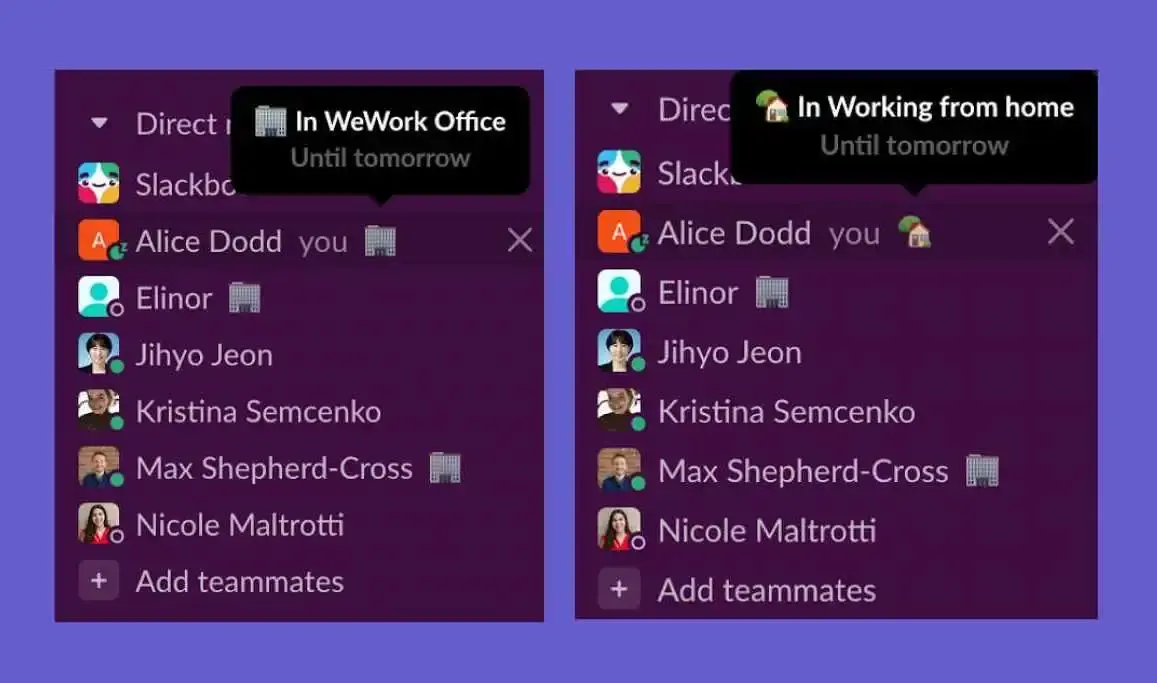
An app that displays your working location in your Slack status.
With Officely, there's no more guessing who’s in the office and when, no more messaging your favorite coworkers to find out who's made the morning commute.
One quick integration later, and your team's Slack status' will tell you everything you need to know.
Does Slack Track Your Location? Here's What You Need to Know
Let's get straight to the point: does Slack track your location? The answer is yes, but probably not in the way you’re imagining. Slack isn't monitoring your every move with a GPS tracker, but it does collect information that reveals your general whereabouts. The primary way it does this is through your IP address. Every time you log in, your IP address gives Slack and your workspace administrators a rough idea of where you are, usually pinpointing your city or region. This is mainly for security purposes and to localize your experience, not to see if you’re working from your favorite coffee shop.
While your desktop activity is limited to this general IP-based location, the story is a bit different on mobile. The Slack mobile app can collect precise GPS data, but it can only do this if you’ve explicitly given it permission. When you first install the app or use a location-based feature, your phone will ask if you want to allow Slack to access your location. If you say no, it can't. If you say yes, it has the ability to collect more specific data. It’s always a good idea to review your app permissions regularly to ensure they align with your comfort level for privacy.
So, what’s the bottom line? Slack knows the general city or area you’re in thanks to your IP address. It doesn’t know your street address unless you grant its mobile app specific GPS permissions. Understanding this helps you make informed choices about your privacy settings. While Slack uses this for legitimate reasons, it highlights the importance of tools that focus on sharing your work status (like being in the office or at home) rather than your precise geographical coordinates. This way, you can give your team the visibility they need without oversharing your personal location data.
How Slack Determines Your Location
So, does Slack play the role of a private investigator, tracking your every move? Not exactly. While Slack isn't designed for employee surveillance, it does use a few key pieces of information to get a general sense of your location. This is mostly for practical reasons, like making sure your notifications are timed correctly and keeping your account secure. It’s not about watching you, but about making the platform work better for you and your team. Let's look at the specific ways Slack can determine your location.
IP Address Tracking
Every time you connect to the internet, your device is assigned an IP address, which acts like a digital return address. Slack can use your IP address to get a rough idea of your location, usually down to the city or region you're in. This is often combined with any business addresses your employer provides to the platform. It’s not precise enough to tell if you’re at your desk or the coffee shop down the street, but it helps Slack with things like regional settings and security checks. This is a standard practice for most online services you use every day.
Mobile GPS Data
If you use the Slack app on your phone, you might be concerned about GPS tracking. Here’s the good news: Slack only collects your precise GPS location if you give it explicit permission to do so. This is an opt-in feature, meaning you are in complete control. The app will prompt you if it needs this information for a specific function, and you can always say no. For most day-to-day communication, there’s no need to have this enabled, so unless you’ve intentionally turned it on, your exact coordinates are kept private.
Time Zone Information
One of the most obvious location indicators in Slack is your time zone, which often appears next to your name. This is a setting you control yourself. It’s incredibly helpful for teams spread across different countries, as it lets your colleagues know when you’re likely to be working. However, it only gives a very broad sense of your location. Knowing you’re in the Eastern Time Zone, for example, doesn’t tell anyone whether you’re in New York or Miami. It’s a simple, user-controlled feature designed for better collaboration, not for tracking.
Third-Party App Integrations
The way Slack handles location data gets more interesting when you add third-party apps. When you connect tools like Google Drive or a project manager, they can share information with Slack based on their own settings. This is where you can intentionally and transparently share your location for a specific purpose. For example, a hybrid work software like Officely integrates directly into Slack to display your chosen work location for the day. This isn't covert tracking; it's a tool that makes it easy for everyone to see who’s in the office for collaborative work, all within the platform you already use. You can explore integrations to see how different apps can add new functionality to your workspace.
What Employers Can See and Track on Slack
While Slack doesn't have a built-in feature to show if you're working from the office or your kitchen table, it does collect certain data. It’s important to understand what information your employer can access, which often depends on their subscription plan and company policies. Generally, employers aren't using Slack to pinpoint your exact location, but they can get a sense of your general whereabouts and activity levels. Let's break down what your company can actually see when you're logged into Slack.
Access Logs
Every time you use Slack, it records your IP address in its "access logs." An IP address can give a general idea of your location, like the city or region you're in, but it's not a precise GPS tracker following your every move. Think of it more like a digital zip code than a specific street address. This information helps companies with security by flagging suspicious logins from unusual locations, but it doesn't provide a 24/7 feed of your physical location. It’s a broad-stroke indicator, not a detailed map of your day.
How Subscription Plans Affect Data Access
The amount of data an employer can access heavily depends on their Slack subscription plan. For workspaces on a Free, Pro, or Business+ plan, access is more limited. However, companies using the Enterprise Grid plan have much broader capabilities. On this top-tier plan, employers can export data from all conversations, including private channels and direct messages. They can also view detailed audit logs and implement data retention policies to save specific information indefinitely. It’s worth knowing which plan your company uses to understand the visibility they have.
User Activity and Content
Beyond location data, Slack tracks a significant amount of activity within your workspace. This includes metadata like when you sign in, which devices you use, and how you interact with messages and files. Your employer can see when you read messages, who you communicate with most frequently, and what files you upload or download. This data provides insights into team engagement and communication patterns. It’s less about where you are and more about how you’re using the platform to collaborate and get work done.
Company-Owned Devices
If you’re using a phone or laptop provided by your company, your employer has more ways to monitor your activity, but this tracking isn't necessarily coming from Slack. Company-owned devices often have Mobile Device Management (MDM) software installed, which can track location, app usage, and other data. In this case, the device itself is being monitored, not the Slack application specifically. It’s a key distinction to make—the tracking is a result of company hardware policies, not a feature inherent to Slack.
What Slack Does NOT Track
While it's good to be aware of what Slack can see, it's just as important to know what it can't track. Your privacy extends beyond the digital walls of your workspace, and Slack respects some of those boundaries. The platform is designed for workplace communication, not for comprehensive surveillance of your every digital move. Understanding these limitations can help you use the tool confidently and effectively, without worrying about overreach. Here are a couple of key areas where Slack draws a line, ensuring your activity outside the app remains private and your direct interactions aren't overly scrutinized by your employer.
General Web Browsing
Let's clear this up right away: Slack is not monitoring your online shopping habits or what you're reading on your lunch break. Its tracking capabilities are strictly limited to your activity within the Slack app or on its own websites. This means your general web browsing history remains private. Slack doesn't have access to the other tabs open in your browser or the apps you use outside of its ecosystem. So, you can rest easy knowing that your search for the perfect weekend getaway or your deep dive into a new hobby isn't being logged by your company's communication tool. Your digital life outside of work-related conversations stays yours.
Read Receipts
If you've ever sent a message and wondered if your coworker is ignoring you, you'll have to keep wondering. Unlike iMessage or WhatsApp, Slack doesn't have 'read receipts' for direct messages or small channels. You can't see a confirmation that a specific person has read your message. While workspace owners on certain plans can see high-level analytics, like how many people have viewed a message in a large public channel, they can't see who those people are. This maintains a level of privacy in your day-to-day interactions. It's all about focusing on effective communication rather than surveillance, ensuring you have the necessary information without crossing personal boundaries.
How to Protect Your Privacy on Slack
While Slack isn't designed to be a surveillance tool, it's always smart to be aware of your digital footprint. Your activity on a company workspace is, by nature, not entirely private, but you can still take steps to protect your personal information. Taking control of your settings and understanding how the platform works can give you greater peace of mind, especially in a flexible work environment. Here are a few practical ways to manage your privacy on Slack without disrupting your workflow.
Use a VPN
A VPN, or Virtual Private Network, is a straightforward tool for adding a layer of privacy to your online activity. It works by encrypting your internet traffic and masking your real IP address, which is the unique identifier that can reveal your general location. When you connect to Slack through a VPN, the platform sees the VPN's IP address instead of your own. This makes it much more difficult for your location to be identified based on your connection, giving you more control over your digital whereabouts while you work.
Manage Mobile Permissions
If you use the Slack app on your phone, you’re in the driver’s seat when it comes to location data. The app can only collect your precise GPS location if you explicitly grant it permission to do so. When you install the app or an update, pay close attention to the permissions it requests. It’s a good practice to regularly review your phone’s app settings and ensure Slack only has access to the information it truly needs to function. If you don’t see a clear benefit to sharing your location, simply deny the request.
Check Workspace Settings
It’s important to understand that your company’s Slack workspace belongs to them. Administrators and owners have tools to view how people use the platform, but what they can see depends heavily on the company's Slack subscription plan. Plans like Business+ and Enterprise Grid offer employers more extensive access to data, including message archives. While you can't change these administrative settings yourself, being aware of your company's plan can help you understand the level of visibility they have into your workspace activity and make informed decisions about your communications.
Avoid Using Personal Devices for Work
A common point of confusion is distinguishing between Slack's capabilities and the software on a company-owned device. If you're using a phone or laptop provided by your employer, it may have monitoring software installed that can track your location and activity, entirely separate from Slack. This isn't a function of Slack itself but rather the device management tools your company uses. To keep your personal and professional lives separate and maintain your privacy, it's always best to use personal devices for personal matters and company devices for work.
Managing Your Time and Location Settings
Coordinating a team that works across different cities and time zones requires clear communication, and Slack has a few built-in settings to help with that. While Slack doesn’t track your physical location in real-time, it uses your IP address and time zone information to help your team know when you’re likely to be working. Getting these settings right is a small but important step in making a flexible work model run smoothly. It helps prevent you from messaging a colleague in a different country before they’ve had their morning coffee and sets expectations for when you’ll be available to collaborate.
However, these native settings only solve part of the puzzle. Knowing someone’s time zone is helpful, but it doesn’t tell you if they’re working from home or are in the office today. For teams that value in-person collaboration, that context is crucial. This is where dedicated hybrid work software becomes essential, filling the gaps left by Slack’s basic features. By integrating directly with Slack, these tools can update your status to show your precise working location for the day, making it effortless to coordinate office days and see who’s around at a glance.
Time Zone Preferences
To keep your distributed team in sync, Slack allows every user to set their own time zone. This ensures that notifications and reminders are sent at appropriate local times. You have two options: you can either set your time zone manually or allow Slack to automatically detect and update it based on your location, which is especially useful if you travel often. Keeping this information current is a simple courtesy that helps your colleagues respect your working hours. You can easily manage your time zone preferences directly within your Slack profile settings to ensure everyone on your team has the right context for when you're online and available.
How Message Timestamps Work
Here’s a detail that often trips people up: the timestamps you see on messages in Slack are based on your computer or phone’s system settings, not the time zone you’ve set in your Slack profile. This means if your laptop’s clock is set to the wrong time zone, the messages you see will reflect that inaccuracy, which can cause confusion when you’re trying to coordinate across different regions. To avoid any mix-ups, it’s always a good idea to double-check that your device’s time and date settings are correct. This ensures that all message timestamps are displayed accurately, giving you a true picture of when conversations are happening.
Officely’s Slack Status Sync:
- Shows you who’s in each office (and you can create multiple offices to reflect different workplaces).
- Features customizable emojis, so you can choose the best one for each workplace.
- Syncs automatically each day.
- Displays who is in the office without any extra work on your part!
- Can be integrated into GCal too, so those in your calendar can book meetings based on your location.
Let’s get started!
Frequently Asked Questions
Can my boss use Slack to see my exact home address? No, Slack doesn't function like a GPS tracker. The platform can only see a general location, like your city, based on your IP address. It cannot pinpoint your specific street address unless you use the mobile app and explicitly grant it permission to access your phone's GPS data, which you are always free to decline.
Is my company tracking me through Slack if I use my work phone? This is a great question that highlights an important difference. If your company provides you with a phone or laptop, that device might have management software installed that can track location. However, this tracking is a function of the device itself, not the Slack application. Slack isn't the tool doing the monitoring in that situation.
If I use a VPN, does that make my Slack activity completely private? Using a VPN is a smart way to protect your location privacy, as it masks your IP address from Slack and your employer. While it hides your general whereabouts, it doesn't hide your activity within the workspace. Your employer can still see your messages and files according to their Slack plan and company policies.
Why does Slack care about my time zone if it's not tracking me? Setting your time zone is less about tracking and more about teamwork. It’s a simple feature you control that helps your colleagues in different parts of the world know when you’re likely to be working. This makes it easier to coordinate and respect everyone's hours, which is essential for any team that isn't in the same office.
Why use Officely if I can just update my Slack status manually? You certainly can update your status manually, but we all know how easy it is to forget. Officely removes that mental task by automatically syncing your work location to your Slack status based on your desk bookings. This ensures the information is always accurate and reliable, so you can see who’s in the office at a glance without chasing anyone down.
Key Takeaways
- Slack provides a general location, not a live GPS feed: The platform uses your IP address to identify your city for security and localization, but it doesn't track your specific movements unless you grant the mobile app explicit GPS permissions.
- Take charge of your digital privacy: You can protect your location information by reviewing mobile app permissions, using a VPN, and understanding that company-owned devices may have separate monitoring software beyond Slack's control.
- Go beyond time zones for true hybrid planning: While Slack shows when someone is online, it doesn't tell you where they are. Integrating a tool like Officely lets your team share their daily work location directly in their status, making office coordination simple.


