



Hybrid Work Policy Template: 10 Essential Elements
If you're tasked with creating your company's hybrid work policy, you know it's a big job. You need to balance employee desires for flexibility with the company's need for productivity and collaboration, all while ensuring fairness. It can feel overwhelming to start from a blank page. That's why we created this guide. We're giving you a complete hybrid work policy template that you can copy, paste, and customize for your organization. Think of it as your starting point for building a clear and effective hybrid work schedule policy.
Often, homeworkers end up working longer hours with fewer career advancement opportunities than their in-office counterparts. Additionally, a lack of a formal hybrid work policy could leave your employees anxious or demotivated. In some cases, it could also create two classes of workers, remote and in-office, with remote employees being treated as “second-class.”
So, once you've established your business is ready for hybrid work, you need to create a strong hybrid working policy that:
- Is equitable and fair to everyone
- Provides the right working conditions to all employees
- Outlines all available hybrid arrangements and requirements
- Sets clear rules for remote and office work, including working hours, required office presence, and communication channels and tools
We also advise you to use hybrid work software to make desk booking and attendance management easier.
Just as workplace policies or employee handbooks outline dos and don'ts for employees, hybrid working policies should lay down clear criteria and rules around hybrid work and also provide best practices for employees.
Below, you'll find a hybrid work policy template you can grab and use for free, plus our top tips on how to build a sensible flexible policy that works well for you and your employees – but first, let’s clarify what hybrid work actually is.
What is a Hybrid Work Model?
Hybrid work is a flexible work model that allows employees to divide their work time between the office and their home – or different locations, such as coworking spaces, libraries, or even coffee shops. It recognizes that not all tasks require a physical presence in the office, and some can be effectively completed from a distance, especially if you provide your employees with the right communication and project management systems.
By implementing a hybrid work model, you can offer your people the freedom to choose where they work and enable them to strike a better work-life balance. This, in turn, can lead to better job satisfaction and retention – and improved employee well-being.
What to Include in Your Hybrid Work Policy Template
The template below is yours to use; you can simply copy and paste it and tweak it to fit your organization's needs.
Start with a Clear Policy Overview
Beginning [Date], [Company] will implement a hybrid work model. All employees are eligible for hybrid work. Schedules must fit within one of the models described below and be cleared by your manager.
Please read the entire policy and sign to confirm you have read it. Contact [name and email of contact person] if you have any questions.
Policy Purpose and Guiding Principles
Think of this section as the 'why' behind your policy. Its main purpose is to create a clear, fair, and consistent framework that supports both employee flexibility and your company's operational needs. It’s important to state that while you encourage flexibility, hybrid work is not a guaranteed right for every role. Arrangements may vary between departments to ensure that fairness and productivity are maintained across the board. The primary focus should always be on what the organization needs to operate effectively and achieve its goals, ensuring that customer service and team collaboration don't suffer.
Your guiding principles should be built on clarity and adaptability. Clearly define what "remote work" means—is it strictly from home, or can employees work from other locations? This prevents misunderstandings down the line. Furthermore, establish that all hybrid arrangements are subject to regular review, perhaps quarterly. This allows you to make adjustments based on individual performance or changing business needs. These principles help lay down clear criteria and rules, ensuring the policy remains effective and relevant for everyone involved as your company evolves.
Define Eligibility and the Application Process
To keep the process fair and transparent, you need to clearly outline who is eligible for a hybrid schedule and how they can apply. This avoids confusion and ensures everyone understands the criteria they need to meet. It sets clear expectations from the start, preventing potential feelings of unfairness or ambiguity down the line. A well-defined process also empowers managers to make consistent decisions and gives employees a clear path to follow if they're interested in a more flexible work arrangement. Here’s how to break it down.
Specific Eligibility Requirements
First, determine which roles can be performed effectively outside the office. Not every job is a fit for hybrid work, and it's important to be upfront about that. Your policy should state that employees must be full-time or part-time and have successfully completed their initial probationary period, typically around three months. It's also reasonable to require that employees maintain a consistent record of good performance and have no recent disciplinary actions. This ensures that hybrid work is a privilege earned through trust and consistent results, setting a clear standard for everyone on the team.
The Formal Application and Approval Process
Create a straightforward application process. It should start with an informal conversation between the employee and their direct manager to discuss the feasibility of a hybrid schedule. If they agree it’s a good fit, the employee should submit a formal request, usually to HR. This application should detail their proposed schedule and describe their home office setup to confirm it meets company standards for safety and productivity. The request is then reviewed by the team leader, the department head, and finally, HR, who gives the final approval. This multi-step review ensures the arrangement works for the individual, the team, and the company as a whole.
Manager Responsibilities
Managers are the gatekeepers of your hybrid policy, so their responsibilities must be clearly defined. They are in charge of reviewing each request, considering not just the employee's wishes but also the overall needs of the team and project workflows. They have the authority to approve or deny requests based on these factors. Once a hybrid schedule is approved, their job isn't over. Managers must regularly check in on employee performance and the overall effectiveness of the schedule. Using a hybrid work software can give them the visibility they need to coordinate team days and ensure collaboration doesn't suffer when people are working from different locations.
Outline Your Hybrid Work Schedule
Hybrid schedules depend on your department; you have flexibility within the hybrid model below. Contact your direct supervisor with questions.
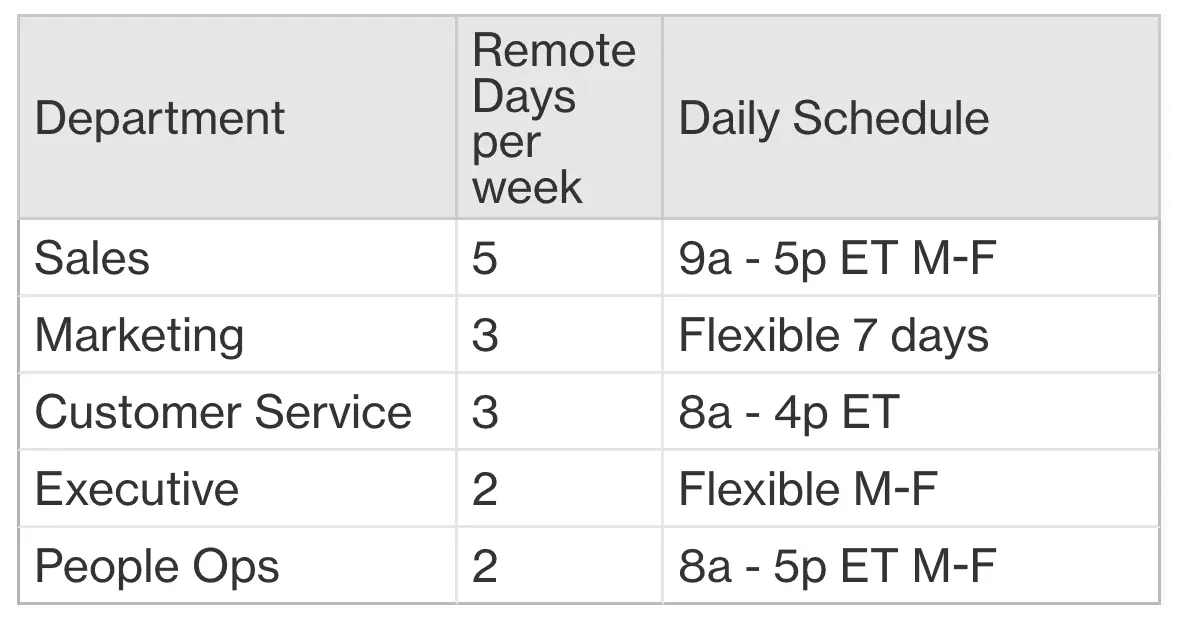
A sample hybrid schedule for different departments
All departments should book office space for in-office days with Officely.
Rules for Work Schedules and Location
Your work schedule will be a mix of in-office and remote days, as agreed upon with your team leader. While we encourage flexibility, you should plan to work from home no more than two days per week unless your department’s schedule specifies otherwise. Your manager can adjust these days based on project needs or team events. If an important in-person meeting falls on your scheduled remote day, you are expected to come into the office. You can arrange to work remotely on a different day that week. Regardless of your location, company time is for company work. You are also responsible for ensuring your home workspace is safe and ergonomic; please check your setup and report any work-related injuries immediately.
Work Hours and Availability
Our core work hours are from 10 a.m. to 4 p.m. You can start your workday anytime between 7 a.m. and 10 a.m., but you must be available and responsive during core hours. Any work required outside of standard business hours must be approved by your manager in advance. Whether you’re at home or in the office, you are expected to be reachable by Slack, email, or phone during your agreed-upon work hours. Your performance standards and professional obligations remain the same regardless of your work location. Maintaining clear and consistent communication with your team is key to making this model a success for everyone.
Set Clear Performance Expectations (KPIs)
Your manager will discuss with you all relevant key performance indicators and how they might be affected by hybrid work.
**
Clarify In-Office Perks and Resources
Employees working at the office more than 3 days a week will have a dedicated desk, parking space, and access to the company gym or childcare services.
Specify Equipment and Software Provided
For all employees, the company will provide:
- Laptop
- Keyboard
- Mouse
- Headset
- Cellphone
Employees working remotely more than 2 days a week will also receive stipends to cover internet costs.
Address Expense Reimbursement
Be crystal clear in your policy about who pays for what. This section should detail any stipends you offer for home office setups, internet, or phone bills. It’s also the place to address travel. While you might cover trips to a client's site, most policies state that the daily commute to the office is not a reimbursable expense. Defining these financial boundaries from the start prevents confusion and ensures everyone understands what’s covered. This keeps the arrangement fair for all employees, no matter where they work.
Beyond expenses, your policy should also cover liability. Clarify the company's responsibility for an employee's home workspace. The company is typically not liable for injuries outside of work hours or for damage to personal property. Your policy should state that employees are responsible for maintaining a safe home office and must immediately report any work-related injuries. This protects both your team members and the business by establishing a clear protocol for safety and incident reporting in a remote setting.
Address Compensation and Benefits
*Compensation might be subject to adjustments if relocating to a different city or area.
Employees will also receive the following additional stipends:*
- Gym memberships/related health membership
- Virtual health consults
- Virtual mental health counseling
- Childcare
- [Add more benefits here]
Establish Communication Tools and Guidelines
Use the following tools for remote communication:
- Email for weekly updates, updates for clients, delivery of material to clients
- Slack for team-wide communication, client groups (if requested), quick announcements
- Google Meet for meetings, presentations, stand-ups
- Officely for updating your work location (remote or from the office) and booking desks
Prioritize the use of public channels of communication and be respectful of others’ time and show up punctually for meetings.
Cover Safety, Security, and Liability
When your team is split between the office and home, it's crucial to have clear guidelines on safety and security. This part of your policy protects both your employees and the company by setting straightforward expectations for everyone, regardless of where they work. It addresses everything from creating a safe home workspace to protecting sensitive company data, ensuring that your flexible work model is built on a foundation of trust and mutual responsibility. Think of it as the digital-age equivalent of the safety posters you see in the office breakroom—essential reminders that help keep things running smoothly and securely.
Home Workspace Safety and Company Liability
Your policy needs to be explicit about safety responsibilities when employees work from home. It should state that employees are responsible for maintaining a safe and hazard-free home workspace. This includes ensuring their setup is ergonomic to prevent strain and injury. It's also wise to clarify liability. The policy should note that workers' compensation typically only covers work-related injuries that occur within the designated home office area during scheduled work hours. Make it clear that any work-related injury must be reported immediately, following the same procedure as an in-office incident.
Data Security and Equipment Use
Remote work shouldn't create security vulnerabilities. Your hybrid policy must emphasize that all company security protocols apply, whether an employee is in the office or at their kitchen table. Clearly state that company-provided equipment is for business purposes only. Employees are responsible for protecting these assets from damage, loss, or theft and must report any malfunctions promptly. This section should also cover data security best practices, such as using secure Wi-Fi networks, locking computers when not in use, and handling sensitive company and client information with the utmost confidentiality.
Commit to Fairness and Equal Opportunity
We’re committed to providing a similar experience to remote and in-office employees. To ensure everyone has equal access to opportunities, managers must:
- Use public channels to announce new work opportunities and projects
- Review how often employees are promoted with respect to their work preferences
Establish Policy Governance and Review
Your hybrid work policy shouldn't be carved in stone. Think of it as a living document that evolves with your company. We recommend reviewing your hybrid arrangements at least every three months. This regular check-in gives you a chance to see what’s working and what isn’t, allowing you to make adjustments based on performance, business needs, or employee feedback. While it's essential to lay down clear criteria and rules, your policy should also be flexible enough to accommodate the different needs of various departments. When you do make changes, be sure to communicate them transparently across public channels. This ensures everyone stays informed and feels the process is fair and equitable.
10 Tips for a Successful Hybrid Work Policy
Below, you’ll find our top tips on how to manage the transition to a hybrid work model – and how to ensure that it works well for you and your team.
1. Decide Who Can Work Hybrid
Before you start building your hybrid policy, define the roles for which hybrid work is possible and those for which it is not.
Here are some examples:
- Roles suitable for hybrid work: Most roles in project management, software development, design, marketing, finance, accounting, and admin
- Roles that require mostly in-office presence: Front desk and customer-facing roles, field staff managers, facility management staff, any role involving physical work
You might still want to offer employees in the second category some flexibility, for example by providing occasional WFH days. You might even have team members from other departments like marketing or finance cover office-based roles like the front desk from time to time to allow for more equitable access to remote work.
If your team has been working remotely but you'd like to switch to a hybrid work schedule, use an employee return-to-work survey to uncover potential concerns.
Make sure to consider resource utilization and how exactly you'll manage your office space. One of the best ways to do that is with the help of desk booking software.
2. Choose the Right Hybrid Model and Schedule
Hybrid work isn’t one-size-fits-all.
Your hybrid work model might be remote-first, where employees are allowed to work remotely most of the time, or lean toward more in-office presence.
Because the term "hybrid" can mean so many things, outline the number of remote workdays allowed in youroffice and the advantages for each preference. For example:
- Remote 1-2 days per week: Because these employees are in the office more frequently, consider offering them a dedicated office or desk and parking space.
- Remote 3-5 days per week: Employees might have to surrender dedicated office desks but will be provided a hot desk or common area to work in the office. They may be eligible for visitor parking.
- Fully remote: These employees don’t have dedicated workspaces and may be eligible for visitor parking. They might visit the office on occasion for a few hours or a day and reserve a hot desk when they do.
Desk booking software like Officely can make it easy to manage different schedules and give everyone the visibility they need to organize their work – and come to the office when others are there.
If you offer fully remote roles, specify if these roles are based out of specific countries, states, or cities. If you need remote employees to come to the office occasionally for client meetings and events, you might prefer to hire in your city or region.
For employees choosing hybrid work arrangements, specify if they'll set their own flexible schedule or if schedules will be manager-led. Employee-led hybrid work schedules usually provide better results, because employees know best where and how they work best.
Whatever style you choose, define when you'd expect team members to be available for work-related communication. Certain roles like customer support might need to work specific hours, even remotely.
3. Re-evaluate Employee Compensation
Be clear about how an employee’s location and work preference (in-office, remote, hybrid) affect their compensation and benefits, so employees can weigh the pros and cons of their choice.
For example, if you have 100% remote positions with the option to relocate to another city or country, you might consider adjusting employee salaries to the cost of living – or decide against it. Or you could provide in-office or hybrid workers with a commute allowance.
Remote-first company Buffer has shared their salary calculator publicly, and you might want to use a cost of living calculator when defining salary ranges. However, you need to make sure you're not penalizing employees who opt for a hybrid model or those who choose to work remotely.
4. Adapt Wellness and Health Benefits
Hybrid work offers ample flexibility, but it also has a few downsides. Employees who often work remotely might feel more isolated and some might need additional support to avoid burnout.
Here are some ways to safeguard employee health and mental wellbeing in remote and flexible working arrangements:
- Offer virtual health consultations on platforms like Teladoc and Wellthy and provide access to mental health services like Talkspace and Lyra Health
- Provide a few hours of free mental health counseling in addition to virtual consulting, if they’re not part of your Employee Assistance Programs (EAPs)
- Normalize taking time off not just for vacation but also for mental health and to care for family
- Offer stipends for exclusive in-office perks like childcare and gyms
- Encourage managers to make video optional during some meetings and reduce the number of mandatory calls per week

Make sure you build a health benefits scheme that's beneficial to hybrid workers
5. Know the Legal Requirements
Ask your legal counsel or HR department about all local and national laws you should comply with in relation to hybrid work. Explain how you’ll fulfill legal requirements in your flexible work policy.
Here are some questions to get you started:
- Where is your business legally allowed to operate? This might affect the locations from which employees can work remotely.
- Do you need to reimburse employees for home office equipment? In states like California, laws require employers to reimburse employees for office equipment like computers, laptops, and desks.
- Do you need to reimburse employees for office travel? While daily commutes are generally not reimbursable, for employees who work primarily from home, you might need to reimburse office travel.
- Do you need to pay overtime? Federal US laws require employers to pay overtime if employees work for more than 40 hours in a week, or in some states, more than 8 hours a day. If such laws apply in your country or state, you’ll need to define how you'll track time and whether employees require manager approval to work extra hours.
Time Tracking and Overtime Compliance
Just because your team is hybrid doesn't mean labor laws go out the window. In the US, for example, remote and hybrid employees are still entitled to overtime protections under the Fair Labor Standards Act (FLSA). Manually tracking hours across different locations and schedules is risky and can lead to costly errors. This is why your policy must specify how you'll track time and whether employees need manager approval for extra hours. Using an automated system is the safest bet, as it can accurately apply the correct overtime rules to employee work hours, removing the guesswork and ensuring you stay compliant no matter where your team works.
6. Choose the Right Technology to Support Your Policy
The success of your hybrid work policy depends on the tools you use. Hybrid work software like Officely makes desk booking simple – and gives your employees and admin staff visibility into office attendance, making it easier to manage hybrid schedules and resources effectively.
With Officely, employees can easily reserve desks, see who’s in the office, and plan their workdays for better collaboration or focused work, all directly within Slack or Microsoft Teams.
Other tools you should consider include:
- Project management platforms like Asana or ClickUp
- Video conferencing software like Zoom, MS Teams, or Google Meet
- Knowledge sharing platforms like Confluence or Notion
For more ideas, check out our article on the best productivity tools for hybrid work.
7. Prioritize Information Security
In your office, you're in control of all security measures like firewalls, virtual private networks (VPNs), on-premise servers, data centers, antivirus software, and authorized company equipment. And, while you can replicate most of these measures in a remote setting, your employees might need extra guidance to comply with data security measures.
When drafting your hybrid workplace policy, outline best practices for employees to keep your data safe, like:
- Set strong passwords and update them regularly
- Install security and software updates on a regular basis
- Avoid downloading suspicious, illegal, or unauthorized software
- Block suspicious websites and report any phishing attempts
- Use only work devices for work, and not their personal computers or smartphones
- Report any loss of equipment or information immediately
- Use a VPN as needed
8. Establish Clear Communication Guidelines
Clear guidelines help eliminate communication silos. For hybrid teams, defaulting to remote-first online communication works best because it's equally accessible to in-office and remote employees.

Setting up clear communication requirements and channels is essential for the success of your hybrid policy
In your hybrid workplace policy, mention:
- Channels or tools for meetings, quick messages, updates, stand-ups, announcements, and reports
- Expected response time for internal emails, client emails, and Slack messages
- Internal knowledge base tools for looking up company-related information, processes, and policies
- Who to get in touch with for common issues
9. Find a Fair Way to Track Performance
In a traditional work environment, time spent in the office was often used as one of the measures of performance and engagement, although we could probably all agree that it's a horribly inaccurate one. In a hybrid workplace, the need for setting clear key performance indicators (KPIs) is even more obvious.
Define what success looks like for different roles. For instance, “Success as a sales manager means contacting X leads per month, a X% of closed deals, and $XX in revenue.”
You can also set goals for employee attendance specially for roles that benefit from in-person collaboration, and use dedicated software like Officely to measure that.
10. Promote Equity Between Remote and In-Office Staff
Proximity bias is one of the most common challenges of hybrid work, or the tendency to favor in-office employees. Team members working from home might miss out on important work-related talks and decisions if they happen in ad hoc meetings or in the hallway.
To provide equal opportunities to all employees, irrespective of the specific hybrid or remote work arrangement they opt for, you might decide to:
- Measure speed of promotion by employees’ work preference to avoid bias
- Announce new work opportunities and challenges using online channels like Slack or email instead of in-person meetings
- Hold virtual ask-me-anything sessions with leadership where employees can voice concerns and ask questions
- Run anonymous employee surveys to gauge employee sentiments
- Make hybrid meetings the norm, so all employees can participate regardless of their location
Frequently Asked Questions
What's the most critical part of the hybrid policy to get right from the start? Your guiding principles are the foundation for everything else. Before you get into the details of schedules and stipends, you need to be crystal clear on why you're implementing a hybrid model and what you hope to achieve. This section sets the tone and ensures that every other part of the policy, from eligibility to performance metrics, aligns with your company's core goals for flexibility and productivity.
How do we choose the right hybrid schedule for our teams? There isn't a single "best" schedule; the right one depends entirely on your teams' functions. A good starting point is to talk with department heads. Your engineering team might thrive with a remote-first approach, while your sales team may need more in-office days for collaborative sessions. The key is to build in flexibility and trust your managers to work with their teams to find a rhythm that supports both individual focus and group collaboration.
How can we truly ensure remote employees aren't treated differently? This comes down to intentional communication and equal access to opportunities. Make it a rule that all major announcements and project opportunities are shared on public digital channels, like Slack, not just in hallway conversations. Train your managers to run inclusive meetings where remote attendees are just as involved as those in the room. It's about creating a communication culture where location doesn't determine an employee's value or visibility.
Do we really need special software to manage a hybrid workplace? You could try to manage with spreadsheets and calendars, but it quickly becomes complicated and inefficient. Using a tool like Officely, which integrates directly into Slack or Teams, removes the administrative headache. It gives everyone clear visibility into who is working from where, simplifies booking a desk for an office day, and helps managers coordinate important in-person collaboration without endless back-and-forth messages.
Our policy is written and signed. Now what? Think of your policy as a living document, not a one-and-done project. Plan to review it quarterly for the first year. Use this time to gather feedback from employees and managers to see what's working and what's causing friction. Business needs change, and your policy should be flexible enough to adapt. This regular check-in process ensures your hybrid model continues to support your team and your company goals effectively.
Key Takeaways
- Build a comprehensive policy from the start: Your hybrid work policy should be a complete guide. Clearly define eligibility, schedule options, and communication protocols to set clear expectations and prevent confusion down the line.
- Address logistics and legalities upfront: Don't leave room for ambiguity on the practical details. Detail your company's stance on equipment, expense reimbursement, data security, and legal compliance to protect both your team and the business.
- Promote fairness with consistent processes and tools: A successful hybrid model depends on equity. Implement standardized communication channels and use hybrid work software to manage office attendance, ensuring remote employees have the same visibility and opportunities as their in-office colleagues.


